User Plugin to Validate Email Domain
The plugin User - Email Check has now been published in the Joomla Extensions Directory (JED). It validates the email domain, the part that comes after the @ sign, by looking it up from the Domain Name System (DNS).
The plugin checks the email field in the user data, when it is entered into the registration form or the profile form by the frontend user or edited by the administrator through the backend of the website.
More information and links to the support forum available from https://extensions.talikka.com.
- Details
- Written by: Toivo Talikka
- Category: Joomla
- Hits: 17620
How to Debug Email in Joomla
If clicking the button 'Send Test Email' ends up in an error message or the test email does not arrive, it is possible to debug the mail function and find out what is wrong. Follow these Joomla tutorials to get a detailed log, consisting of the SMTP connection dialogue and all the status codes. If the reason for the failure is a mystery, create a topic at the Joomla Support Forum and copy and paste the log file for the volunteer Joomla experts to study and give their advice.
How to debug SMTP mail in Joomla 4
How to debug SMTP mail in Joomla 5
Please note that Joomla 3 and Joomla 4 send the test email to the email address specified in the field 'From Email' in the Mail section of the Global Configuration,, a few lines up from the Send Test Mail button, whereas Joomla 5 and Joomla 6 send the test email to the email address of the logged-in Super User. That makes sense, because it allows you to test different email addresses, but remember to change your email address back after the test.
- Details
- Written by: Toivo Talikka
- Category: Joomla
- Hits: 643
Fetching User Custom Fields in Joomla 4
This example displays three user custom fields, fielda, fieldb and fieldc. It uses the PHP function array_column() and therefore it does not need a foreach loop.
use Joomla\CMS\Factory;
use Joomla\Component\Fields\Administrator\Helper\FieldsHelper;
$customFields = FieldsHelper::getFields('com_users.user', Factory::getUser(), true);
$values = array_column($customFields, 'value', 'name');
// echo 'values = ' . print_r($values, true);
echo 'fielda = ' . $values['fielda'] . ' fieldb = ' . $values['fieldb'] . ' fieldc = ' . $values['fieldc'];
- Details
- Written by: Toivo Talikka
- Category: Joomla
- Hits: 24535
Finding the origin of cryptic messages
Sometimes websites produce warnings or error messages without giving any clues what caused the issue. Surely this has happened to everyone and it is annoying, especially if it happens at a website you are supposed to maintain.
Recently someone reported that they are unable to update articles because every time they try they get the message "Warning, Registration failed. Please try again." Clearly this message does not belong anywhere near the editing process where articles are updated or created. Something must have gone wrong in a third party extension or a home grown plugin.
If you have a similar situation where a seemingly unrelated error or a warning is reported in the browser, search for the text string from the website or clone or simply download the filesystem of the site and search on your workstation. A utility like grep or Windows grep are the easiest to use.
The text of the message is most likely to be found in one of the language files. This of course assumes that the extension that produced the message follows Joomla best practice of keeping the message texts in separate files, consisting of language constants and language strings.

Third party extensions add their own language files into the languages folder either at the front end or the back end of the site, or both. Extensions can also install their language files in a subfolder in the same folder where the extension itself is installed. Therefore a text search utility is the best approach to find any obscure messages where the origin can be anywhere in the system.
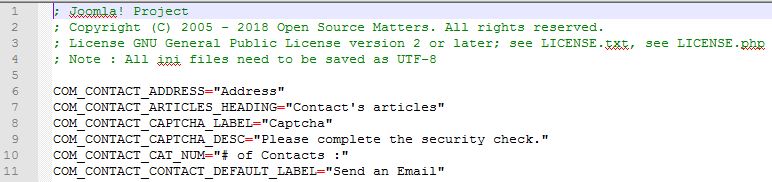
Once you find a match in a language file, copy the language constant from the start of the line and then search for that constant from the website filesystem or its copy exactly the same way, using a utility like grep or Windows grep. This way you can identify the file or all the files where the language constant has been used and you will be able to identify the extention.
If the message is not defined in one of the language files, it would have had to be hard coded in a third party extension, for example a plugin, which you may then be able to unpublish.
- Details
- Written by: Toivo Talikka
- Category: Joomla
- Hits: 11476
Page 1 of 2