Gmail as SMTP Host in Joomla 3.6.5
Make sure you have Google 2-Step Verification turned on: https://www.google.com/landing/2step/
As explained in this article: https://support.google.com/accounts/answer/185833?hl=en, create an application specific password, "App Password", 'my-app-password' below, for your SMTP connection: https://security.google.com/settings/security/apppasswords
Now you can use the following mail settings:
SMTP Host smtp.gmail.com
SMTP Port 587
SMTP Security STARTTLS
SMTP Authentication Yes
SMTP Username
SMTP Password my-app-password
- Details
- Written by: Toivo Talikka
- Category: Joomla
- Hits: 11518
Troubleshooting SMTP connection in Joomla 3.x
If your Joomla! site has issues in connecting to your SMTP mail server, it is possible to get a detailed log of all the messages exchanged between your Joomla site and the SMTP server. Inspecting this low level transaction log allows you to see what is going wrong between the two servers and then get your IT department or hosting provider to resolve any connectivity issues.
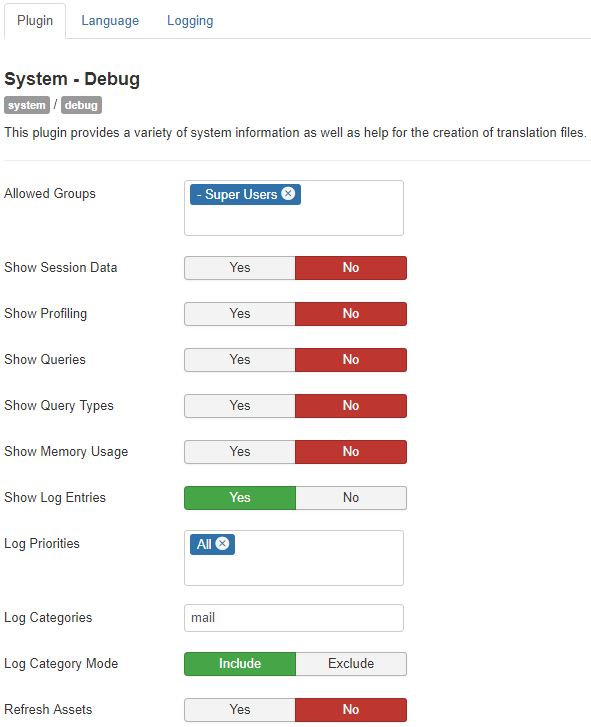
Go to Extensions - Plugins and configure the system plugin 'System - Debug' with the following settings:
- Allowed Groups: Super Users
- Log Priorities: All
- Log Categories: mail
- Log Almost Everything

Go to Global Configuration and turn on the debug option in the System tab - Debug Settings - Debug System.

Go to the Server tab - Mail Settings and click the button Send Test Mail.

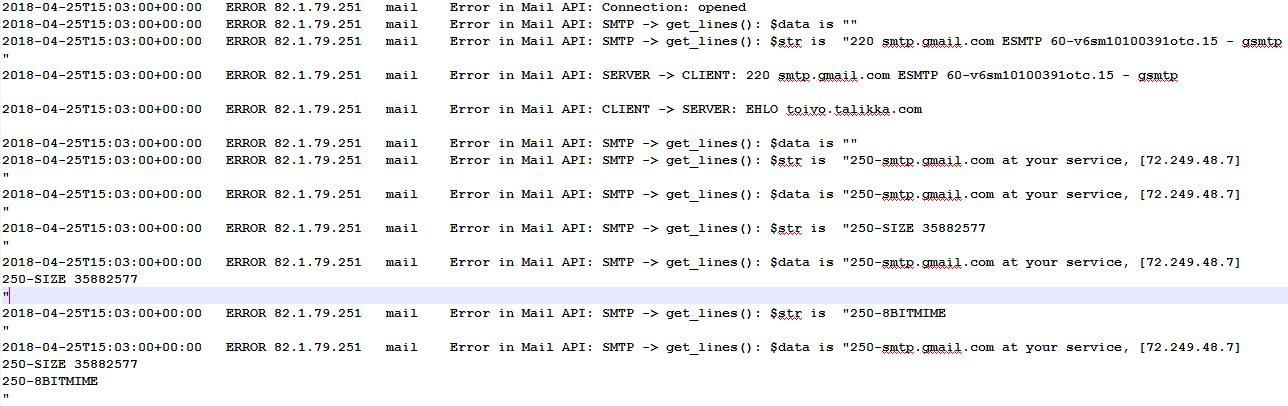
The test result, success or failure, will then get displayed as a system message, but you can download the detailed log file 'everything.php' from the Joomla log folder, usually administrator/logs, or, if your site was installed much earlier, from the /logs folder in the main Joomla folder.
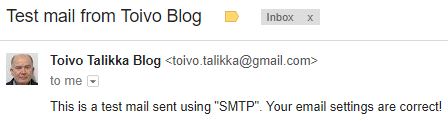
And this is the email we would like to receive from the website:
More about logging from the Joomla! Documentation at https://docs.joomla.org/Using_JLog
- Details
- Written by: Toivo Talikka
- Category: Joomla
- Hits: 12524
Adding Time to Logged-In Users
The Joomla 3.x Control Panel shows a list of users who were active at the site, at the front end or the back end.
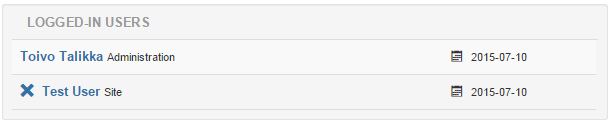
The data is displayed by a module called Logged-in Users. In previous versions of Joomla the time of the last activity was also displayed for each user, which was useful. In version 3.x only the date is included. If you want to add the time back to the listing, it can be done easily in a template override. Here are brief instructions how to do that in Joomla 3.4.3, using the Isis administration template.

If you do not want to hard code the date & time format into the layout, you can define your own format as a language constant in the Language Manager - Overrides.
Subsequent Joomla updates will not overwrite the override code but you need to maintain it, should something change in the core code.
- Details
- Written by: Toivo Talikka
- Category: Joomla
- Hits: 14131
Viking Way - Part 2
Barnetby le Wold


From Marsh Lane through wet fields
We thought that we took the direction the Viking Way sign was pointing to but that happened to be a wrong road. We walked over a mile all the way to the water treatment facility, Barnetby Sewage Works, before we decided to turn back towards Marsh Lane. A friendly farmer pointed us to the right direction and we started on the track through the fields.
This part proved to be most challenging because we wanted to keep our hiking boots dry and it had been raining a few days before.


Village names ending in 'by'
In this region many villages have names ending in 'by'. This naming practice started during the rule of the Danes about a thousand years ago. Danelaw or the laws of the Danes were followed in the northern and eastern parts of England from the 9th century until the 11th century:
Bigby, Somerby, Searby, Grasby, Clixby
We continue walking on bridleways and public rights of way through fields. Some parts are still wet and some quite muddy at this time of the year.
Bigby


Somerby


Nettleton and The Salutation Inn
The second section of The Viking Way ends in Caistor, but we continue a couple of kilometres further to Nettleton, knowing that it will give us a chance to have a meal at The Solution Inn. As far as we had been able to find out, there was no practical bus connection we could have used from Caistor or Nettleton back to Barnetby le Wold Saturday afternoons, not even by changing to another bus or train. The pub in Nettleton would be the best place from where to organise a cab back to Barnetby. Both the meal and getting a cab turned out to be a great success.

- Details
- Written by: Toivo Talikka
- Category: Viking Way
- Hits: 7580
Page 2 of 2